Showing the single result
A self-ordering kiosk is a touchscreen-based ordering system that allows customers to browse menus, select items, and place orders directly from an interactive display. This technology is widely used in restaurants, cafés, food courts, and retail stores to simplify the ordering process and reduce waiting time.
Businesses across the country are increasingly adopting Self-Ordering Kiosk Bangladesh solutions to automate customer service and improve order management. Customers can review their order, customize menu items, and complete payment directly through the kiosk without staff assistance.
The demand for digital ordering systems is growing rapidly, especially in major cities such as Self-Ordering Kiosk Dhaka and Self-Ordering Kiosk Chattogram. Restaurants, shopping malls, and food courts are implementing kiosk technology to improve service efficiency and handle large customer traffic.
Before implementing an automated ordering system in your restaurant or retail business, it is important to understand the Self-Ordering Kiosk Price in Bangladesh and compare different kiosk configurations.
Different restaurant and retail environments use various types of self-ordering kiosk systems depending on layout, available space, and customer traffic. Selecting the right kiosk format helps businesses improve customer experience and streamline ordering operations.
Floor-standing kiosks are the most commonly used ordering solution in fast-food restaurants and high-traffic environments. These standalone units are installed directly on the floor so customers can easily interact with the touchscreen while standing.
Large restaurants, shopping malls, cinema lobbies, and food courts often install floor-standing kiosks because they are highly visible and easy for customers to access. A large display helps customers clearly view menu items, promotions, and product images while placing orders.
For example, a
32-inch self ordering kiosk
provides better menu visibility and improves the overall user experience. These kiosks can also integrate with POS systems and kitchen display systems so that orders are automatically sent to the kitchen.
As a result, floor-standing kiosks help reduce order errors, improve service speed, and manage high customer traffic efficiently.
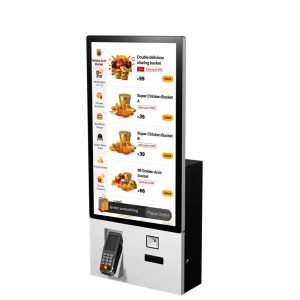
Wall-mounted kiosks are installed directly on the wall and are ideal for restaurants or retail stores with limited floor space. This type of kiosk is commonly used in small cafés, takeaway shops, and quick-service restaurants.
Because the system is mounted on the wall, it saves valuable floor space and keeps the ordering area organized. Customers can quickly access the kiosk, browse the menu, and complete their order without waiting in line.
Wall-mounted kiosks are especially useful in compact restaurant environments where businesses want to add digital ordering capabilities without installing large kiosk units.
Countertop kiosks are placed on service counters or checkout areas and are designed for smaller retail or food service environments. These kiosks are commonly used in bakeries, dessert shops, cafés, and small takeaway restaurants.
Customers can interact with the kiosk while standing at the counter, making the ordering process faster and more convenient. Because countertop kiosks require minimal installation space, they are often considered a practical and cost-effective solution for small businesses.
They also allow businesses to introduce digital ordering without making major layout changes to the store or restaurant.
Tablet ordering kiosks are lightweight and flexible solutions that use tablet devices to accept customer orders. These systems are commonly used for table-side ordering in casual dining restaurants or product browsing in small retail environments.
Because tablet-based kiosks are portable and easy to deploy, restaurants can place them on dining tables so customers can order directly without waiting for staff assistance.
This type of system improves service efficiency, reduces staff workload, and allows restaurants to provide a modern digital ordering experience to customers.
When businesses choose a self-ordering kiosk system, they evaluate both hardware reliability and software capabilities. A well-designed kiosk improves customer experience while making restaurant operations more efficient.
The touchscreen interface is the most important component of any kiosk system. A responsive display allows customers to browse menus, view product images, and customize orders quickly and easily.
High-quality touchscreens provide smooth interaction and reduce user frustration, especially during busy hours when customers expect a fast ordering process.
A well-designed touchscreen interface also improves navigation, allowing customers to move through menu categories, review orders, and complete transactions efficiently.
Many restaurants want their kiosk system to integrate with an existing POS (Point of Sale) system. With POS integration, orders placed through the kiosk are automatically transferred to the restaurant’s billing software and kitchen display system.
This automation eliminates manual order entry, reduces the chance of order errors, and ensures that kitchen staff receive accurate order details instantly.
POS integration also allows restaurant owners to monitor sales data, track order history, and manage operations more efficiently.
Modern kiosk systems support multiple payment methods including debit cards, credit cards, QR payments, mobile banking, and contactless payments.
Providing multiple payment options improves customer convenience and allows restaurants to process transactions quickly without requiring staff assistance.
Secure payment integration also ensures that customer transactions are safe and compliant with digital payment standards.
An advanced menu management system allows restaurant owners to update menu items, modify prices, and introduce promotional offers easily.
Using a centralized management system, businesses can update menu content across multiple kiosks instantly, ensuring consistent information for customers.
This flexibility helps restaurants adapt quickly to menu changes and seasonal promotions.
Smart kiosk software can automatically recommend additional items based on the customer’s order. For example, if a customer selects a burger, the system may suggest fries, drinks, or dessert items.
These automated upselling suggestions increase the average order value and help businesses generate additional revenue.
Restaurants often use this feature to promote combo meals, limited-time offers, and special promotions.
Multilingual interfaces allow customers to place orders in their preferred language, which is particularly useful in tourist areas and international restaurant environments.
By providing language options, businesses can serve a wider audience and improve customer satisfaction.
This feature also makes the ordering process easier for customers who may not be familiar with the primary language used in the restaurant.
Different self-ordering kiosk screen sizes serve different business needs. Restaurants, cafés, food courts, and retail stores should select the right kiosk size depending on available space, customer traffic, and menu complexity. A properly sized kiosk display improves customer interaction and makes the ordering process faster and easier.
Smaller kiosks are usually installed in compact environments where space is limited, while larger displays are commonly used in high-traffic restaurants or shopping mall food courts where customers need a clear and interactive ordering interface.
| Screen Size | Best Use Case | Typical Location | Advantages |
|---|---|---|---|
| 21 Inch | Small restaurants and cafés | Countertop or compact ordering areas | Space-saving design and lower cost |
| 27 Inch | Medium-sized restaurants | Quick service restaurant ordering zones | Better menu visibility with moderate space usage |
| 32 Inch | High-traffic restaurants and food courts | Shopping malls, fast-food chains | Large display improves user interaction and menu browsing |
| 43 Inch | Premium retail and large restaurants | Luxury stores, large dining spaces | Maximum screen visibility and enhanced customer engagement |
Restaurants usually choose kiosk screen sizes based on their daily customer traffic and ordering environment. Small cafés or takeaway shops may use 21-inch or 27-inch kiosks because they require less installation space.
However, busy fast-food restaurants, food courts, and shopping mall dining areas often use larger displays such as 32-inch or 43-inch kiosks. Larger screens allow customers to clearly see menu items, promotions, and product images, which improves the overall ordering experience.
The Self-Ordering Kiosk Price in Bangladesh varies depending on several factors including screen size, hardware performance, payment modules, and software capabilities. Restaurants and retail businesses typically choose kiosk configurations based on their operational needs and customer volume.
For example, a
32 inch self ordering kiosk
is commonly used in high-traffic restaurant environments because the larger screen provides better visibility and improves the ordering experience.
| Price Factor | What It Includes | Impact on Cost |
|---|---|---|
| Screen Size | 21”, 27”, 32”, or 43” touchscreen display | Larger screens usually increase overall kiosk cost |
| Hardware Configuration | Processor, RAM, storage, printer, scanner | Higher performance hardware increases price |
| Payment Integration | Card reader, QR payment, NFC payment modules | More payment options increase system cost |
| Software Licensing | POS integration, ordering software, menu management | Advanced software systems increase price |
Restaurants implementing kiosk technology usually evaluate both hardware and software requirements before selecting a system. Small businesses may start with basic touchscreen kiosks, while larger restaurant chains may choose advanced systems with integrated payment and POS connectivity.
As kiosk features become more advanced, the overall Self-Ordering Kiosk Price in Bangladesh increases. Therefore, choosing the right configuration based on business needs is important for achieving the best return on investment.
Businesses looking for self-ordering kiosk solutions often search for professional installation services in major commercial cities such as Self-Ordering Kiosk Dhaka and Self-Ordering Kiosk Chattogram.
Professional kiosk providers support businesses with hardware installation, POS integration, payment module setup, and software configuration to ensure the system operates smoothly.
By implementing kiosk systems with proper installation and integration, restaurants and retail businesses can significantly improve service speed, reduce customer waiting time, and increase operational efficiency.
Restaurant owners and retail managers often have several questions before implementing a self-ordering kiosk system. The following questions explain how kiosk systems work, where they are used, and what factors affect the Self-Ordering Kiosk Price in Bangladesh.
A self-ordering kiosk is a touchscreen ordering system that allows customers to browse menus, select items, and place orders independently. These kiosks are commonly used in fast-food restaurants, cafés, food courts, and retail stores to reduce waiting time and improve service efficiency.
Customers interact with the kiosk using a touchscreen interface. They browse the menu, select items, confirm the order, and complete payment through the kiosk system. The order is then automatically sent to the kitchen display system or POS system.
The cost of a kiosk system depends on factors such as screen size, hardware configuration, payment modules, and software integration. Larger displays and advanced payment systems typically increase the overall system price.
Self-ordering kiosks are widely used in fast-food restaurants, cafés, food courts, cinemas, shopping malls, and retail stores where businesses need to serve a large number of customers quickly.
Yes. Modern kiosk systems can integrate with POS systems, allowing orders placed through the kiosk to automatically appear in the billing system and kitchen display system.